Trade smarter,
faster.
A modern trading terminal with live market data, click-to-trade execution, and a screener built for active traders. Connect your broker, find the opportunities, and act in seconds.
What you get
Everything an active trader needs, in one terminal.
intrady combines a professional-grade data layer with the speed and polish of a modern app — so you can stay in flow instead of stitching tools together.
Live market data
Level-1 and Level-2 quotes, streamed live from your connected broker.
Powerful screener
Filter the market by price, volume, relative volume, float, and technical rating.
Alerts that reach you
Price crosses, new highs, volume spikes, and symbols entering a saved scan — as a toast, a sound, or an OS notification.
Click-to-trade ladder
A live depth-of-market ladder: buy the bid, sell the ask, flatten — one click, no order form.
Risk-managed orders
Set your risk and stop; intrady auto-sizes the position and attaches the bracket — with an optional account-wide exposure limit to guard against over-sizing.
Order flow analysis
Reads live Level 2 and the tape to call the flow — buying, selling, absorption, or spoofed size pulled from the book.
Market timeline
A live feed of new highs, big moves, volume spikes, and news across the whole market — filtered to what you trade.
Composable workspaces
Drag any widget into any cell, stack them into tabs, split panels to taste.
News, on the ticker
Live headlines joined to the symbols you watch, with sentiment.
Multi-monitor popouts
Pop any panel into its own window and link it to a symbol sync group.
Options & Level 2
Full options chains and a live depth-of-market order book.
Portfolio & P&L
Positions, realized and unrealized P&L, and equity at a glance.
Workspaces
Build the layout. Then build another.
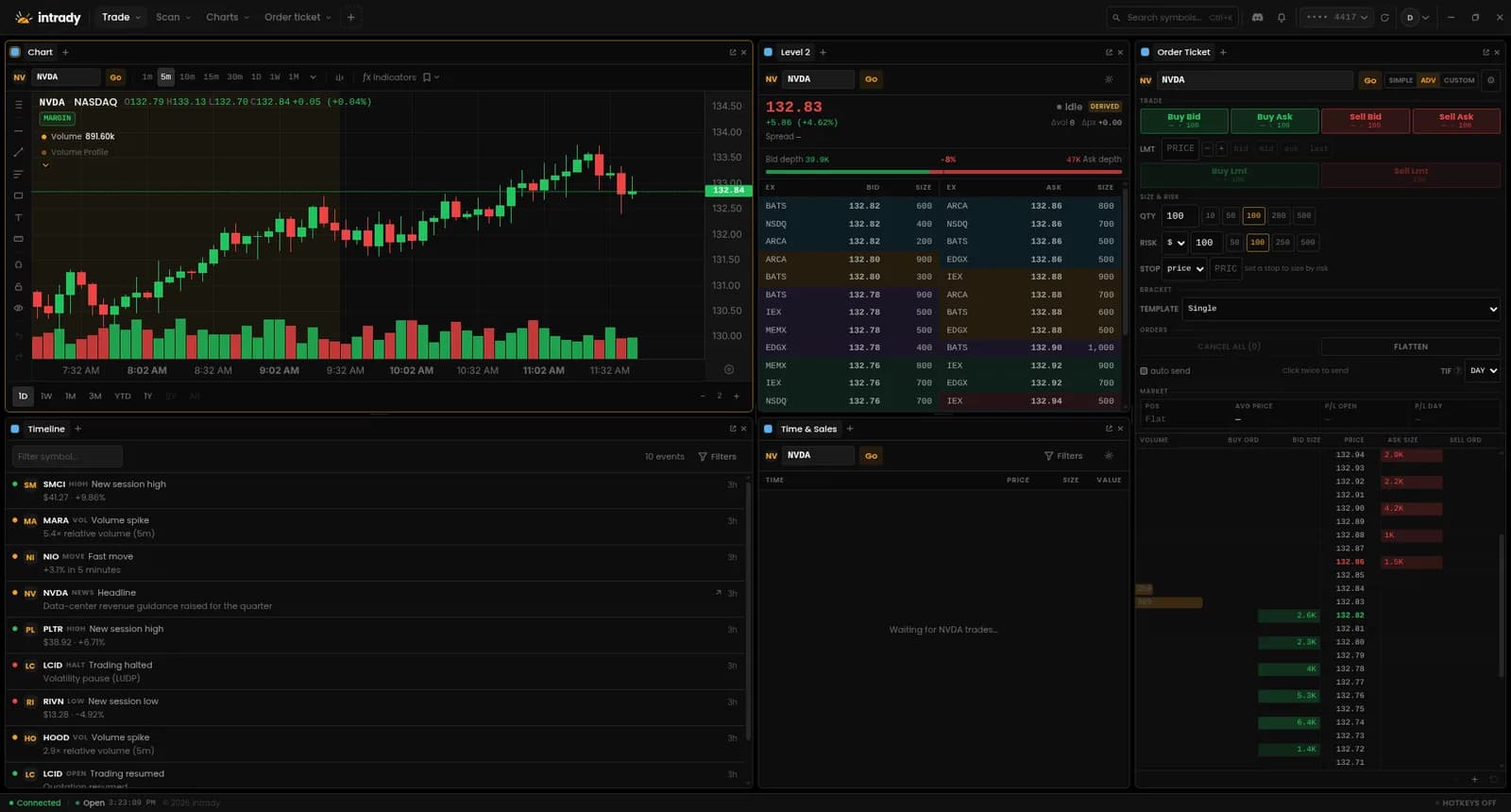
Every screen is a workspace you compose yourself. Drag a widget into any cell, stack widgets into tabs, and split panels until the layout fits the way you trade. Name it, duplicate it, and switch between layouts from the tab strip.
- Start from a preset — Advanced, Chart trading, Scan, Overview, or Analytics
- Stack widgets into one cell as tabs, or split a panel in any direction
- Pop any panel onto a second monitor and link it to a symbol sync group
Charts
Read the tape. Draw your orders on it.
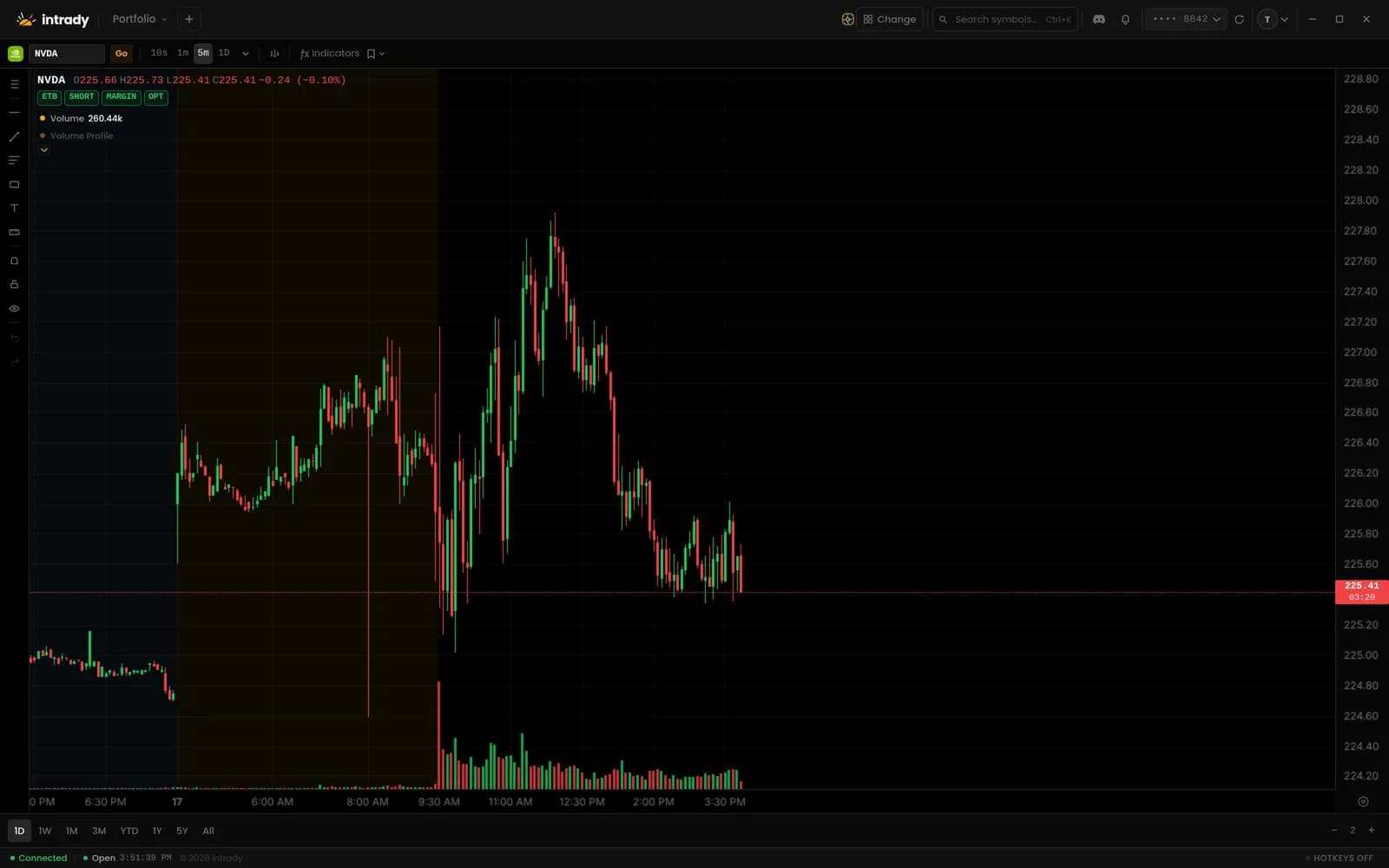
The full standard indicator library — moving averages, bands, volatility, trend, momentum, oscillators, volume, and candlestick patterns — with every oscillator in its own time-synced sub-pane. Your working orders render right on the price axis.
- Overlays on price; RSI, MACD, and the rest in stacked sub-panes
- Drag a working-order line to reprice it, or hit × to cancel in place
- Intervals from 1-second telescope bars all the way out to monthly
Order ticket
A DOM built for quick execution.
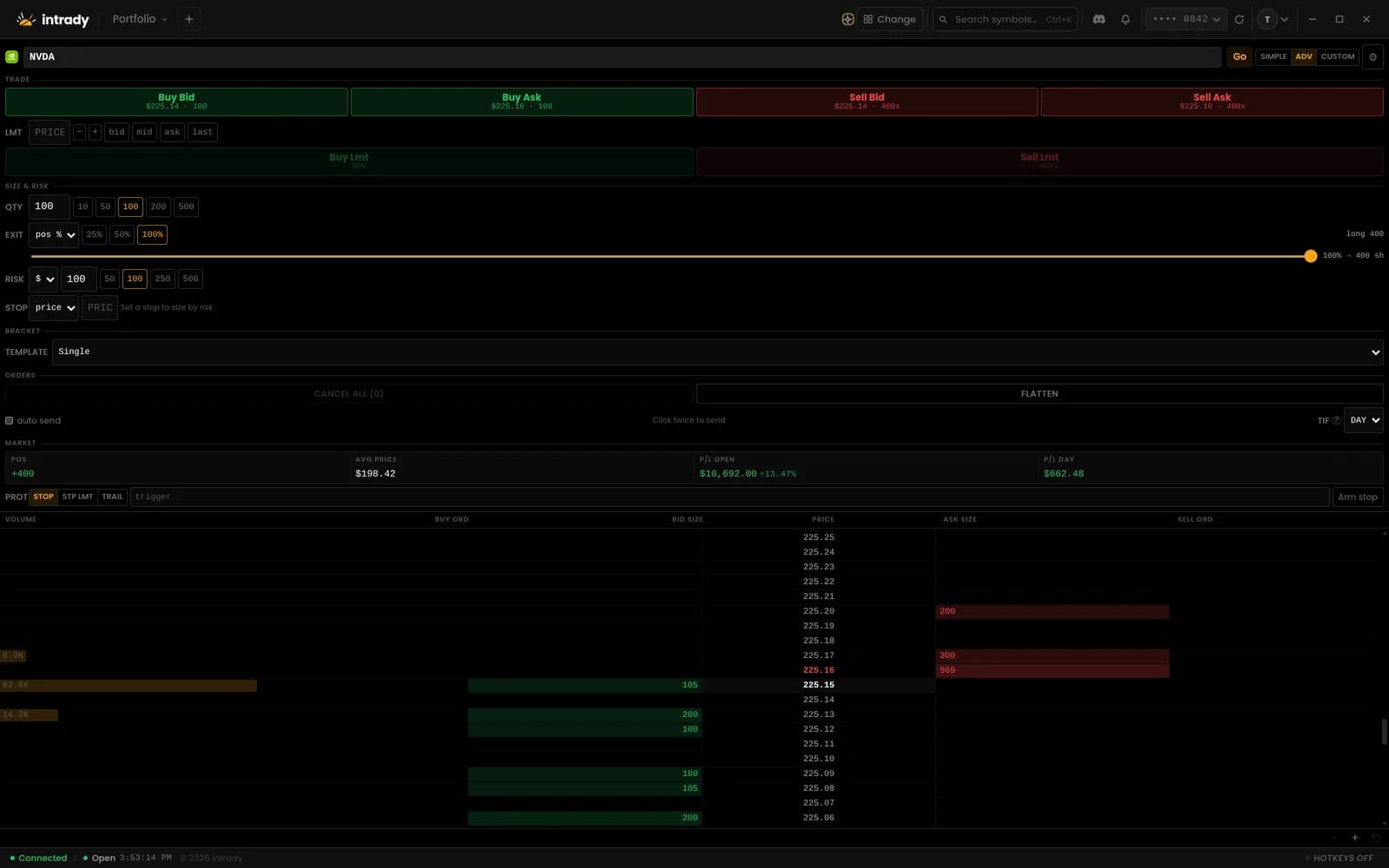
Buy the bid, sell the ask, flatten the position — without ever leaving the ladder. Volume traded at price, live bid and ask depth, and your own resting orders all sit in one grid you can click straight into.
- Buy/Sell at bid or ask, quantity presets, TIF, and optional one-click auto-send
- Click the bid to buy, the ask to sell, or your own order to cancel it
- Position, average price, and open/day P&L pinned above the ladder
Risk & sizing
The stop sizes the trade. The account sets the ceiling.
Type a risk budget and a stop, not a share count — intrady divides one by the other to size the position, then attaches the protective bracket (profit target and stop) that ships with the entry. Turn on an optional account-wide exposure limit and a good setup never quietly over-deploys the book.
- Auto-size from risk-per-trade ÷ stop distance, or a percent of capital — no quantity typed
- Entries carry an OCO bracket: profit target and stop, sized as a share of the position
- Optional per-account exposure limit — set a ceiling and intrady caps and warns before you place the order; leave it off and nothing changes
Screener
Find the movers in seconds.
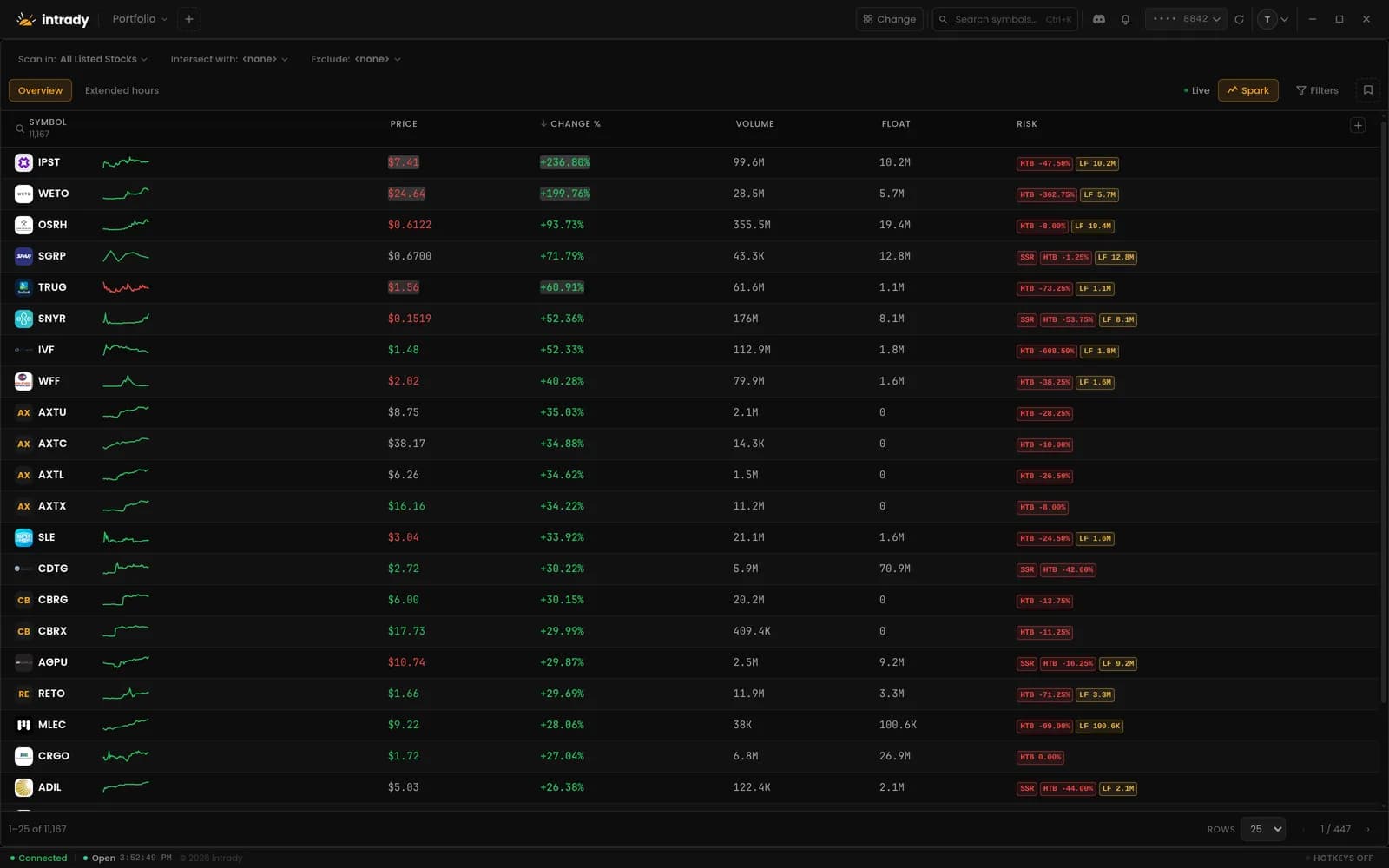
Filter the entire market by price, change, volume, and relative volume — then add float, market cap, sector, extended-hours moves, or technical ratings as columns. Save a screen as a preset and drop it into any workspace.
- Grouped filters with ANY/ALL logic, saved as named presets
- Relative volume from 5 minutes to 50 days, plus RSI, ATR, MACD, and Bollinger columns
- Click any row to open the ticker in every panel linked to that sync group
Get early access.
intrady is launching soon. Join the early-access list and we’ll email you the moment it opens.
FAQ
Common questions.
What brokers do you support?
intrady connects to your existing brokerage account through your broker’s official OAuth flow — you authorize access on your broker’s own site, and your login credentials never touch our servers. We’re finalizing broker partner approvals now and will announce supported brokers at launch.
What does the broker connection allow?
On the broker’s authorization screen you grant access so intrady can display your account, positions, and orders, and transmit trades that you initiate. You can revoke that authorization at any time in the app or through your broker. We never receive your brokerage username or password.
How do you protect my brokerage connection?
Broker tokens are encrypted before they are stored. Refresh tokens stay on our servers and are never sent to the desktop app. Connections use TLS. You can disconnect your broker at any time. Card payments are handled by Stripe — we do not store full card numbers. More detail: /security and /privacy.
How current is my market data?
For the symbols you watch, we stream Level-1 and Level-2 quotes from your connected brokerage account, refreshed about once per second. Across the broader market, prices update about once per second from our market data feed. Everything is live and streaming — not a delayed feed — though it is not a tick-by-tick exchange feed.
What will intrady cost?
One plan, everything included — no feature tiers, no add-on data packages. We’re finalizing the exact price for launch; expect it to be in line with consumer charting platforms, not the hundreds per month that pro-style terminals charge. Every account will start with a 14-day free trial of the full product.
Is intrady a broker?
No. intrady is a software platform that connects to your existing broker. We never hold customer funds.
Can I use multiple monitors?
Yes — pop any panel out into its own window and arrange your setup across as many monitors as you have. Each layout is a named workspace you can switch between from the tab strip, and popped-out windows stay in sync with the symbol group you assign them to.
Do you support options and Level 2?
Yes — full options chains and a live depth-of-market (Level 2) order book stream alongside your charts, so you can read the bid-ask ladder before placing an order.
Can I trade directly from the chart?
Yes. Working orders draw as dashed lines on the chart at their resting price — drag one to reprice it, or cancel it in place. The order ticket adds a click-to-trade ladder, so you can click the bid to buy and the ask to sell.
Can intrady size my positions for me?
Yes. Set a risk budget and a stop and intrady calculates the share count for you — risk ÷ stop distance — or you can size as a percent of capital. Entries can automatically attach a bracket (profit target and protective stop). And if you want a backstop against over-sizing, you can set an optional account-wide open-exposure limit that caps the size and warns you before you deploy more than you intend — it is off until you set it. These are your own discipline guardrails computed on a live snapshot — your broker remains the authority and can still reject an order at submit.
Is there a desktop app?
Yes — intrady is a native desktop app for macOS, Windows, and Linux. Your account, layouts, and saved screens sync across every machine you sign in on.